
macOS App
Poke Gate includes a native SwiftUI menu bar app for macOS 15+ (Sequoia).
First-run setup
On first launch, a Setup View guides you through two steps:
- Choose access mode — select Full, Limited, or Sandbox (see Access modes below)
- Grant permissions — the app checks for Accessibility permission and walks you through enabling it in System Settings
The setup view only appears once. You can change the access mode anytime from Settings.
Menu bar
The app runs in the menu bar only — no Dock icon. Click the door icon to see the popover:
- Status — green dot when connected, yellow when connecting, red on error
- Personalized — shows "Connected to your Poke, name"
- Recent activity — last few log entries
- Action buttons — Logs, Agents, Settings, Restart/Start, Quit
- About — dynamic version pulled from the app bundle (no hardcoded strings)
- Access mode chip — shows the current mode with quick-switch buttons
Status icons
| Icon | Meaning |
|---|---|
| 🚪 (open) | Connected |
| 🚪 (closed) | Stopped or connecting |
| ⚠️ | Error |
Access modes
The macOS app lets you choose an access mode from Settings or the popover. Changing the mode restarts poke-gate automatically.
| Mode | What it allows |
|---|---|
| Full System Access | All tools available, subject to chat approval for risky actions |
| Limited Permissions | Safe tools and curated command families only (ls, cat, grep, curl, etc.) |
| Run in Sandbox | Broader command support, but writes restricted by macOS sandbox-exec to ~/Downloads and /tmp |
When Full mode is selected, the app shows an Accessibility permission prompt — this permission is required for keyboard/mouse automation and AppleScript tasks.
Accessibility permission
The app uses an Accessibility-first permission model. Instead of requesting Full Disk Access, the app checks for Accessibility permission using the native AXIsProcessTrusted() API.
- A dedicated AccessibilityPermissionView shows the current status with a button to open System Settings
- Permission state refreshes automatically whenever the app regains focus
- The view updates live — no need to restart the app after granting permission
When Full mode is active, this view appears in both the Settings window and the popover to ensure you don't miss it.
Settings
Open Settings from the popover. The settings window shows:
- Authentication status — whether you're signed in via Poke OAuth
- Sign in button — runs
npx poke loginand opens a browser window - Connection status — current state with a Reconnect button
- Access mode — radio buttons for Full, Limited, and Sandbox with descriptions
- Accessibility status — permission check with a direct link to System Settings (in Full mode)
Logs
The Logs window shows real-time activity:
- Tool calls are highlighted
- Errors appear in red
- Sandbox status shown for each command (
sandbox=osorsandbox=none) - Copy all logs to clipboard
- Clear logs
Agents Editor
The Agents window provides a built-in editor for managing agent scripts — no external editor needed.
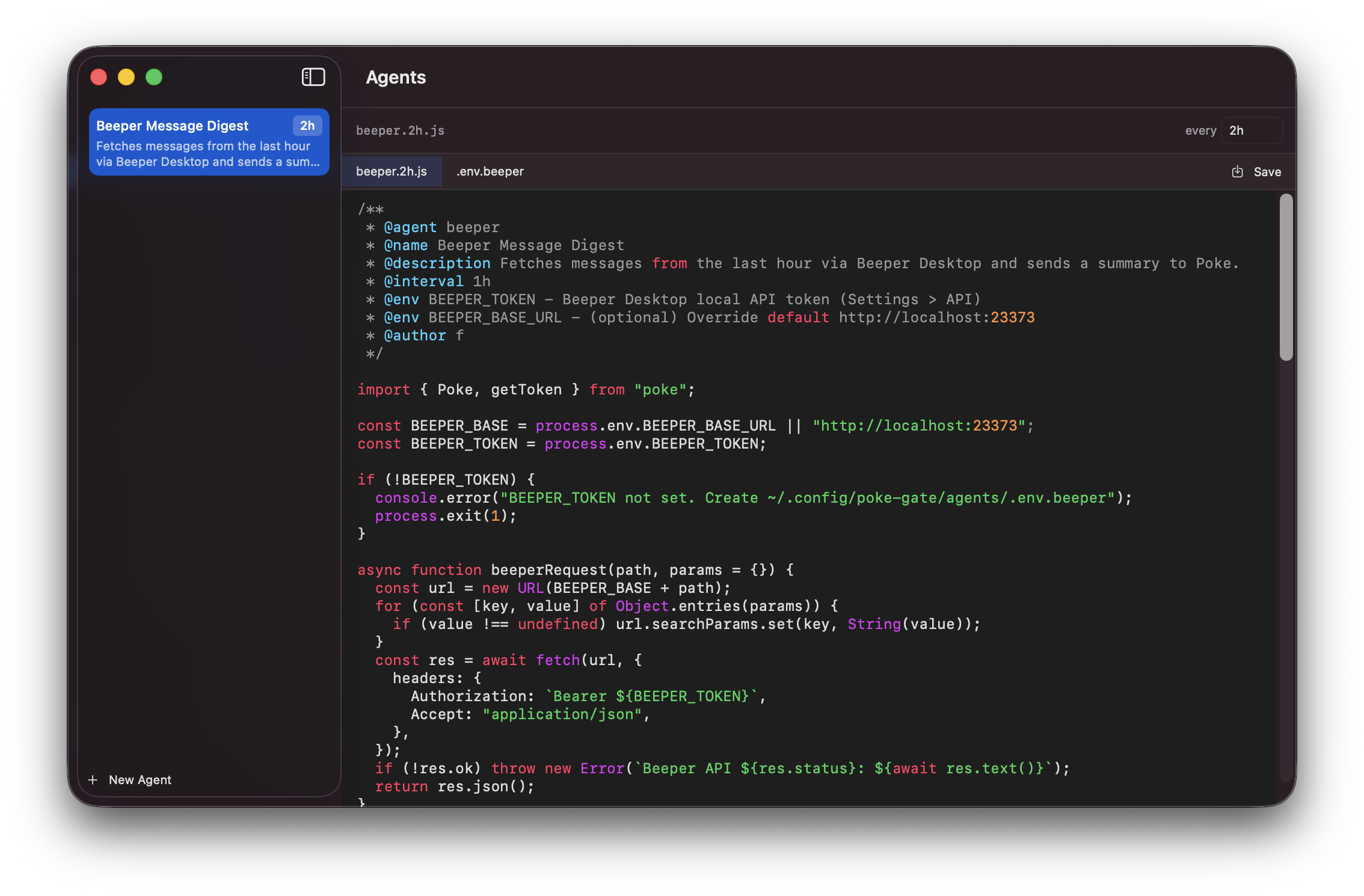
- Sidebar — lists agents by
@namefrom frontmatter, with interval badges and descriptions - Editor — native syntax-highlighted code editor for JavaScript and env files
- Tab bar — switch between
.jsfile and.envfile - Interval editor — change the schedule by typing a new interval (renames the file automatically)
- New Agent — creates a template agent with frontmatter
- Delete — right-click to remove an agent and its env file
Learn more about agents in the Agents documentation.
Auto-start
The app connects automatically on launch if you've previously signed in. If the connection drops, it reconnects after 2 seconds.
Building from source
Requires macOS 15+ and Xcode 16+.
git clone https://github.com/f/poke-gate.git
cd poke-gate/clients/Poke\ macOS\ Gate
open Poke\ macOS\ Gate.xcodeproj
Hit Run in Xcode, or build a universal DMG:
cd poke-gate
./build.sh